
How to Add Free Browser Games to Your WordPress Website - No Coding Required
Add free browser games to your WordPress site using Games I Know. Use a block or shortcode to embed mobile-friendly games in minutes.
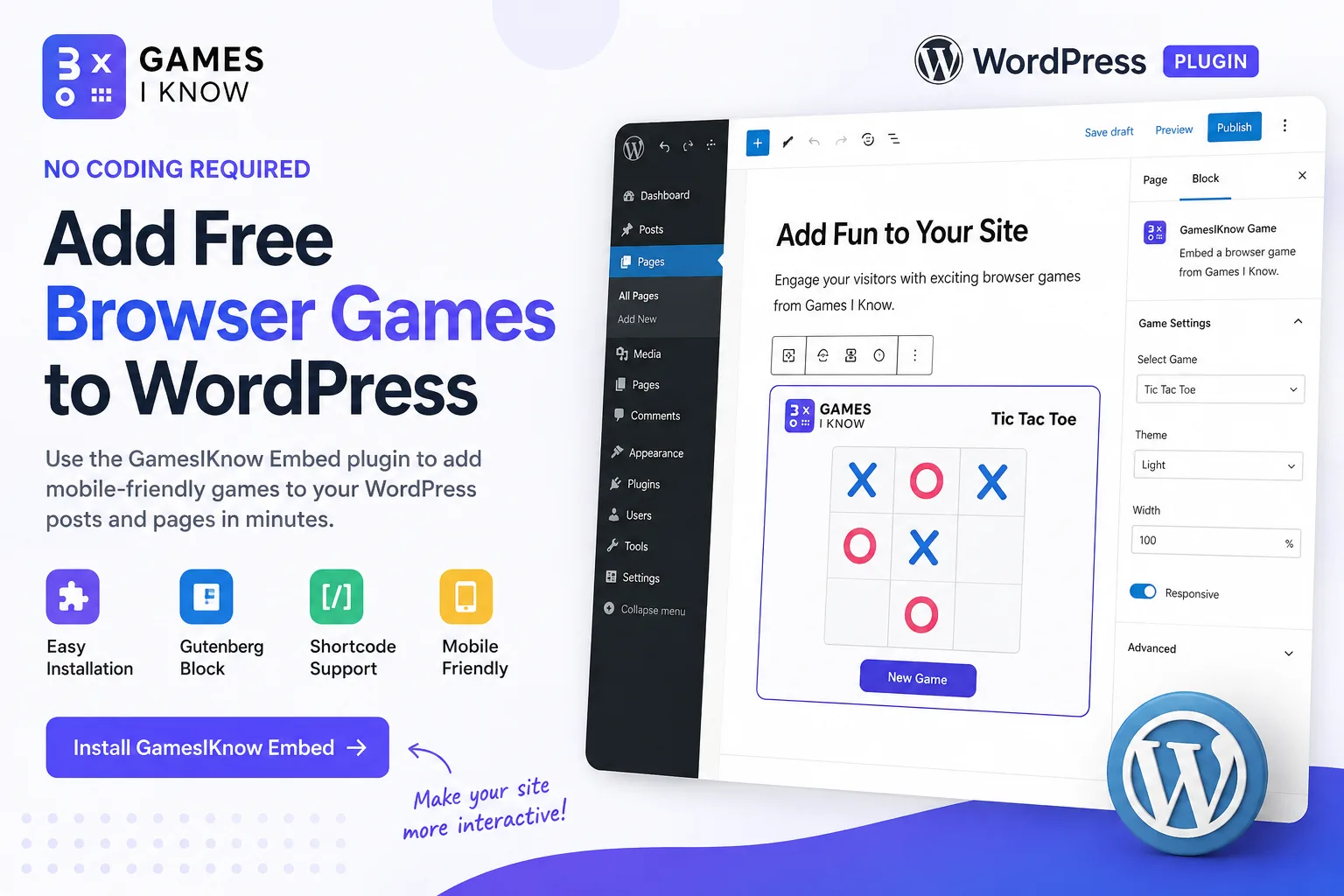
Many WordPress websites are built to be read, scanned, and clicked through. That works well for blogs, business pages, and resource hubs, but it can also feel static. Adding a small playable browser game gives visitors something interactive to do without asking them to download an app or leave your site.
Games I Know offers lightweight browser games such as Tic Tac Toe, Four in a Row, Bingo, and I Know. With the Embed Browser Games by Games I Know WordPress plugin, you can add those games through the block editor or a shortcode instead of manually pasting iframe HTML.
Quick answer: how do you add games to WordPress?
Install Embed Browser Games by Games I Know, add your Partner ID in Games I Know > Settings, insert a Games I Know Game block or `[gamesiknow]` shortcode, preview the page on desktop and mobile, and publish. Visitors play directly in the browser with no app download.
Why add browser games to a WordPress website?
A browser game does not need to turn your site into a gaming portal. For many WordPress sites, the best use is a small interactive moment inside a larger page: a quick activity at the end of a blog post, a waiting-room game on a restaurant page, a classroom activity, or a fun break on a community site.
- Games can increase engagement and time on page when they fit the content.
- Visitors get something to do without leaving your WordPress site.
- Blog posts and landing pages can feel more memorable with a simple interactive element.
- Schools, communities, and local businesses can add playful content without building a custom app.
- Browser games run instantly - no app store download required.
- You avoid building a custom game from scratch when a hosted embed is enough.
Who is this useful for?
- Bloggers who want interactive blog posts
- Schools and teachers running classroom activity pages
- Community websites and membership sites
- Restaurants and waiting-room QR pages
- Local businesses adding a light engagement touch
- Agencies building client WordPress sites
- Niche publishers and resource hubs
- Internal team portals with a quick break activity
What is GamesIKnow Embed?
GamesIKnow Embed is the embed platform from Games I Know. It lets website owners add playable browser games to their own sites through safe iframe URLs. For WordPress users, the official plugin, Embed Browser Games by Games I Know, adds a settings screen, a Gutenberg block, a shortcode, and a Shortcode Builder so you do not have to write iframe HTML by hand.
Confirmed plugin features include the Games I Know Game block, the `[gamesiknow]` shortcode, Games I Know > Settings for Partner ID and default embed behavior, and Games I Know > Shortcode Builder for copy-ready shortcodes. Partner ID is required: without it, games will not load in the embed iframe. It connects your WordPress site to your Games I Know partner account and approved domain.
Step-by-step: add a browser game to WordPress
- Log in to your WordPress admin dashboard.
- Open Plugins > Add New.
- Search for "Embed Browser Games by Games I Know".
- Click Install Now, then Activate.
- Open Games I Know > Settings in the left admin menu.
- Required: click Get Partner ID, sign in at Games I Know, copy your Partner ID from the Install tab, paste it into the Partner ID field, and click Save Partner ID.
- Optional: enable lazy load by default and allow fullscreen by default if those match how you want games to behave on the frontend.
- Create a new post or page, or edit an existing one.
- Insert the Games I Know Game block from the block inserter, or add a shortcode such as [gamesiknow game="tic-tac-toe"].
- Choose the game and layout options in the block sidebar or shortcode attributes.
- Preview the page on desktop and mobile. Confirm the game iframe loads and has enough height.
- Publish or update the page.
Add a game with the WordPress block
The plugin registers a block called Games I Know Game in the WordPress block editor. Open a post or page, click the block inserter (+), search for "Games I Know", and add the block. Use the block sidebar to choose the game, theme, mode, width, height, alignment, border radius, shadow, lazy loading, and fullscreen options.
The block renders on the frontend only. In the editor you see a summary card and the shortcode equivalent, which helps you understand what will appear after publish. If Partner ID is missing, the block shows a warning in the editor and games will not load on the frontend until you save a Partner ID in Games I Know > Settings.
Add a game with a shortcode
If you prefer shortcodes, or need them in classic editor areas, widgets, or page builders that support shortcodes, use `[gamesiknow]`. The plugin also includes Games I Know > Shortcode Builder, which generates copy-ready shortcodes from wp-admin.
[gamesiknow]
  [gamesiknow game="tic-tac-toe"]
  [gamesiknow game="four-in-a-row" height="620" theme="dark" mode="ai"]
[gamesiknow game="bingo" width="480px" height="720" campaign_id="summer-campaign"]Supported game slugs are `tic-tac-toe`, `four-in-a-row`, `bingo`, and `i-know`. Optional attributes include `width`, `height`, `max_width`, `align`, `theme`, `mode`, `campaign_id`, `border_radius`, `shadow`, `lazy`, and `allow_fullscreen`.
Where should you place games on a WordPress site?
- At the end of a blog post as a related activity
- On a dedicated Play or Activities page
- On a classroom or school resource page
- On a community hub or event page
- In a landing page section with enough width
- On a restaurant or waiting-room page
- On a kids activity page
- In a wide content area or full-width block
Avoid very narrow sidebars. Browser games need enough width and height to be playable, especially on mobile. The plugin Shortcode Builder includes recommended sizes per game.
Which game should you add first?
- Tic Tac Toe - best for quick, simple play and first tests
- Four in a Row - best for light strategy and family-friendly pages
- Bingo - best for groups, classrooms, and events
- I Know - best for trivia and quiz-style interaction
Manual iframe vs WordPress plugin
You can embed Games I Know games manually with iframe HTML or use the WordPress plugin. For most non-technical WordPress users, the plugin is the simpler path because it handles block UI, shortcodes, settings, and safe iframe URLs for you.
| Method | Best for | Difficulty | Notes |
|---|---|---|---|
| GamesIKnow WordPress plugin | WordPress posts, pages, and typical wp-admin workflows | Easy | Uses the Games I Know Game block, `[gamesiknow]` shortcode, and plugin settings |
| Custom HTML iframe | One-off embeds or builders with an HTML block | Moderate | You paste iframe code yourself and manage sizing and updates manually |
| Developer integration | Custom themes, headless WordPress, or app-like experiences | Advanced | Useful when engineering teams want full control over layout and events |
Tips before publishing
- Preview on mobile and desktop before publishing.
- Add a short heading above the game so visitors know what to do.
- Explain the activity in one sentence, for example, "Play a quick round while you read."
- Avoid stacking too many live game embeds on one page.
- Test again after changing themes or page builders.
- Use clear game titles and iframe titles for accessibility.
- Keep surrounding page content useful so the page still reads well for search.
Troubleshooting
The game does not appear
Confirm the plugin is activated, the page is published, and you used the Games I Know Game block or a valid `[gamesiknow]` shortcode. Check that your theme or page builder allows iframe output on the frontend.
The shortcode shows as plain text
WordPress only runs shortcodes in content areas that process them. If you see literal `[gamesiknow]` text, switch to a Shortcode block, classic shortcode support, or a builder widget that executes shortcodes.
The block is not visible in the editor
Search the block inserter for "Games I Know Game". If it still does not appear, confirm Embed Browser Games by Games I Know is active and that you are editing with the block editor.
The wrong game appears
Check the game slug in the block sidebar or shortcode. Supported values are `tic-tac-toe`, `four-in-a-row`, `bingo`, and `i-know`.
The game looks too small on mobile
Increase the height attribute, use a wider content area, and avoid narrow sidebar placement. The Shortcode Builder lists recommended sizes per game.
Partner ID questions
A Partner ID is required for games to load. Open Games I Know > Settings, click Get Partner ID, sign in at Games I Know, copy the value from your partner dashboard Install tab, paste it into the Partner ID field, and click Save Partner ID. Also confirm your WordPress site domain is approved in your partner dashboard.
A page builder or theme interferes with the embed
Some builders strip iframe content or block custom blocks. Try the shortcode in a native WordPress Shortcode block, test with a default theme, or consult the builder docs for iframe and shortcode support.
Related games & embeds
Explore Games I Know pages connected to this guide.
Frequently asked questions
Can I add games to WordPress without coding?
Yes. Install Embed Browser Games by Games I Know, add your Partner ID in Games I Know > Settings, add the Games I Know Game block or a [gamesiknow] shortcode, and publish. No custom HTML or PHP is required for basic embeds.
Do visitors need to download anything?
No. Games run in the browser inside an iframe from Games I Know. Visitors do not need an app install or player account to start playing.
Does this work on mobile?
Yes. Games I Know embeds are designed for browser play on phones, tablets, and desktops. Preview your WordPress page on mobile before publishing to confirm height and layout.
Can I add games inside blog posts?
Yes. Add the block or shortcode inside a post, page, or other WordPress content area that supports blocks or shortcodes.
Is a WordPress plugin required?
No. You can paste iframe HTML manually, but the GamesIKnow Embed WordPress plugin is the recommended option for most WordPress users because it adds a block, shortcode, settings, and Shortcode Builder.
Do I need a Partner ID?
Yes. Games I Know embeds require a Partner ID in the iframe URL. Add it once in Games I Know > Settings before publishing blocks or shortcodes, or the game will not load.
Which Games I Know games can I embed?
The plugin supports tic-tac-toe, four-in-a-row, bingo, and i-know.
Can I use Games I Know on a business website?
Yes. Businesses use embeds on waiting pages, local landing pages, and promotional posts. Schools and educational websites use them on classroom activity pages, resource hubs, and student-facing landing pages. Review Games I Know terms and privacy policy, and add your Partner ID in plugin settings so embeds load on your domain.
Can I add more than one game to a website?
Yes. You can place multiple blocks or shortcodes on different pages. Avoid loading too many game iframes on a single page unless you have a clear reason, such as a game picker landing page.
Related articles
June 2, 2026·14 min read
How to Add Games to Your Website
Learn how to add games to your website using iframe embeds, game widgets, and free browser games. Add interactive Games I Know games to blogs, WordPress sites, business websites, and more.
June 9, 2026·13 min read
How to Make Your Blog More Interactive
Learn how to make your blog more interactive with quizzes, polls, games, tools, checklists, and simple engagement ideas for better user experience.
April 18, 2026·3 min read
Quick games to play online when you have 5 minutes
Discover quick browser games you can play online in just a few minutes. No login, no download - just open a game and start playing.
Get in touch
Questions about this topic?
Send support questions, embed requests, partnership ideas, or feedback. Your message is saved securely and forwarded to our support channel for review.